If posting regularly feels like trying to keep a garden alive with no time to water it, autoblogging is a “time-saving” strategy that sounds tempting. Set it up once, then watch new posts appear while you work on other parts of your WordPress site.
Still, autoblogging isn’t magic, and it isn’t “copy and paste the internet.” Done well, it’s automated content creation, a workflow that collects data, processes it, and publishes content with guardrails, so your site stays useful, original, and compliant in 2026.
This guide breaks down how autoblogging works on WordPress, what you should automate (and what you shouldn’t), and the safeguards that keep you out of trouble.
What autoblogging is (and what it isn’t)
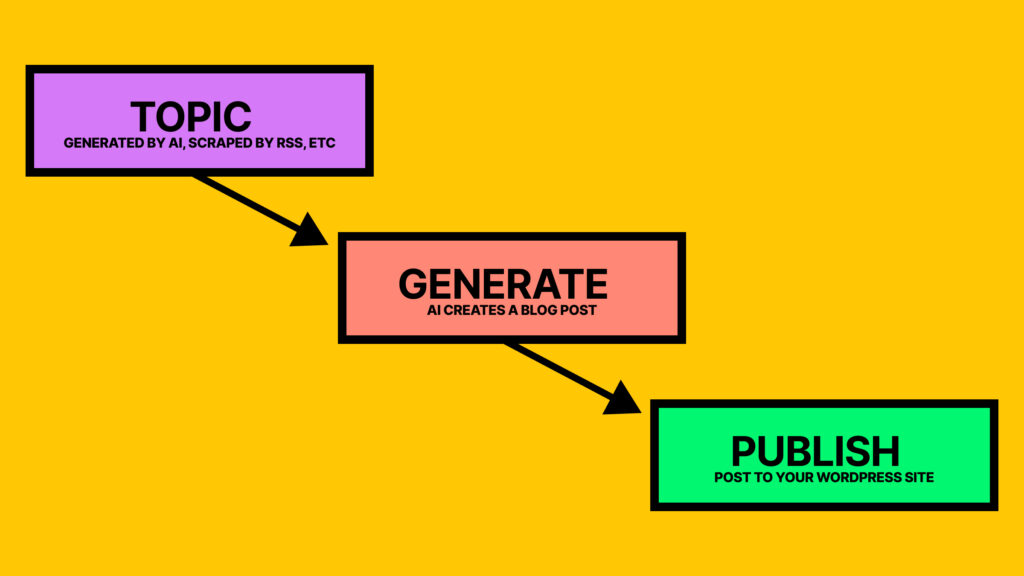
Autoblogging is the process of automatically creating WordPress posts from external inputs, like AI topic generation, RSS feeds, external APIs, or structured sources like YouTube channels. A plugin (or an external service connected to WordPress) pulls items on a schedule, formats them, and then publishes them, or queues them for review.
The important part is how you use it.
Autoblogging is useful when you need timely updates, recurring summaries, or curated roundups. For example, you might run a niche site like a local events site that uses content curation to import event listings from approved partners, then adds your own notes, maps, and “who it’s for” advice. Another good fit is a niche news brief where you publish short, attributed summaries, then link to original reporting.
On the other hand, autoblogging becomes risky when it turns into bulk publishing of duplicate content, hurting your search engine optimization. Google’s 2026 spam policies still target scaled content abuse, including automated pages that exist mainly to rank without adding real value. High-quality automated pages help visibility on search engine results pages (SERPs), while low-quality ones harm it. That’s true whether the content comes from scraping, feeds, or AI.
If your auto-posts don’t add something a reader would miss, they aren’t helping your site. They’re just filling space.
So, think of autoblogging as a conveyor belt. It can move items fast, but you still choose what goes on it, how it’s labeled, and what gets rejected.
How autoblogging works in WordPress, from source to published post
Most WordPress autoblogging setups follow the same pipeline, even if the plugin names differ. Here’s what’s happening behind the scenes:
- You pick a source type. Common inputs include RSS/Atom feeds, keyword-based content discovery, and APIs (some tools like RightBlogger can pull from YouTube or social media platforms). Your first job is deciding what you’ll accept and what you’ll refuse.
- Automated systems run the import through automated scheduling. WordPress often relies on WP-Cron (triggered by site visits), although many site owners prefer a real server cron for reliability on low-traffic sites.
- A WordPress plugin fetches items and normalizes them. Titles, dates, authors, images, and categories get mapped into WordPress fields. Better tools also store a source ID so they can skip duplicates later.
- Content processing happens next. Depending on your rules, the plugin might:
- Create a short excerpt and keep the original link as the main destination.
- Build a summary and add attribution.
- Use AI to draft a rewritten version (which still needs editing).
- Insert internal templates like disclaimers, pros and cons blocks, internal linking to other relevant posts on the site, or affiliate disclosures.
- Publishing and rate controls kick in. Instead of dumping 50 posts at once, you drip them out. Rate limits protect your site performance and help you avoid obvious automation footprints.
If you’re exploring tools, start by reading how a plugin handles external dependencies, storage, and scheduling. For example, the WordPress.org listing for AI Autoblogger, a vital part of your content sources strategy, shows that it fetches content through an external API, which means uptime and data handling matter as much as WordPress settings.
Also, if your workflow includes AI-generated content, keep the writing step separate from publishing. You can generate a usable first pass, then rewrite with your own experience and screenshots.
If you want a starting point for that part of the workflow, SmartWP’s AI WordPress article writer can help you move from topic to draft fast, but you still own the accuracy and final voice.
How to autoblog responsibly in 2026 (sources, originality, safeguards, monitoring)
Autoblogging only works long-term when you treat automation as a helper, not a replacement for judgment. That starts with your sources.
Choose sources like an editor, not a scraper
Before you import anything, set criteria you can explain out loud:
- Permission and licensing: Always verify clear rights to republish, quote, or summarize to avoid copyright infringement. RSS feeds do not automatically grant republication rights.
- Consistency and quality: If a feed is full of thin posts, your site will inherit that problem. For automated systems, this ensures quality control in automated content creation.
- Stability: Feeds break, endpoints change, and APIs get rate-limited. Pick content sources that won’t disappear next month.
- Audience match: A high-authority source is still a bad source if it doesn’t serve your readers.
When you’re unsure, summarize and link out, rather than republishing full text.
Add unique value so the post earns its place
Your edge is what you know, not what you can import. Good “value add” options include short comparisons, a local angle, setup steps, updated screenshots, or a plain-English explanation of what changed and why it matters. Adding these original insights boosts search engine optimization and builds organic traffic. Even a tight “what to do next” section can turn a generic update into something useful.
Put safeguards in place before you scale
A safe autoblogging setup usually includes:
- Manual review queues: Import to Draft or Pending Review for human oversight, especially when editing AI-generated content, then publish after edits.
- Duplicate detection: Skip posts with matching titles, source IDs, or near-identical text.
- Plagiarism checks: Use them as a filter, then still verify quotes and facts.
- Fact-checking habits: Confirm dates, prices, product names, and “breaking” claims.
- Rate limits: Cap imports per hour and per day, and throttle AI calls to avoid runaway costs.
- Logging: Keep import logs so you can trace failures, broken feeds, and unexpected spikes.
WordPress offers cost-effectiveness as a publishing platform for content marketing, but safeguards like these help produce unique articles through automation combined with manual editing.
A good rule: don’t automate anything you can’t monitor.
Monitor performance and search trust signals
After you turn autoblogging on, watch three places:
- Google Search Console: Coverage issues, manual actions, indexing drops, sudden crawl spikes, and meta descriptions on imported posts.
- Analytics: Engagement by template, source, and category (auto content should not be your highest bounce rate cluster).
- Server and plugin logs: Cron failures, feed timeouts, memory errors, and API limits.
If a source starts producing low-quality items, pause it quickly. Your site’s overall quality signals matter more than volume.
Autoblogging vs AI content generation vs RSS readers
Here’s a quick way to think about the differences, especially for sites pursuing affiliate marketing and monetization strategies:
| Approach | What you get | What you control | Main risk | Best use |
|---|---|---|---|---|
| Autoblogging | Posts created in WordPress automatically | Source rules, templates, scheduling, review gates | Low-value scale and duplication | Curated briefs, listings, structured updates |
| AI content generation | Drafts written from prompts or outlines | Voice, structure, originality (with editing) | Hallucinations and sameness | Tutorials, comparisons, first drafts |
| RSS feed readers | A private stream of updates | Your reading list, not your site | No publishing workflow | Research and topic discovery |
If you’re combining autoblogging and AI, keep human review in the middle to create unique articles. SmartWP’s guides on the best AI writers for bloggers can help you choose tools that support editing and consistency, not just fast output.
Autoblogging Tools (RightBlogger, Outrank, Arvow)
If you want automation without turning your site into a content firehose, the tool matters. Some tools are better at “publish more.” Others are better at helping you publish better with less effort.
1. RightBlogger

RightBlogger is the best way to automate your blog if you want automation that still feels like you are running a real editorial workflow. Instead of only pushing out posts, it helps you create drafts you can quickly shape into something original.
- Best for: WordPress users who want faster drafts, a cleaner workflow, and more control over quality.
- How it helps: you can generate posts from real inputs (like topics and video content), organize them in a simple publishing flow, then send them to WordPress as drafts or scheduled posts.
- Why it tends to work well long-term: it makes it easier to add your “human layer” (examples, screenshots, internal links, edits) before publishing, which is the part that protects you from thin, repeatable content.
2. Outrank

Outrank is more focused on SEO planning and keyword-driven writing. It is designed to help you fill a content calendar based on search opportunities.
- Best for: turning keyword ideas into consistent, SEO-shaped drafts.
- How it helps: you pick topics or keywords, it generates posts, and it can publish to WordPress on a schedule.
- Watch-out: it is easy to let keyword automation drive the whole strategy. You still need to add distinct angles, real-world insight, and updates, or posts can start to feel similar.
3. Arvow (formerly Journalist AI)
Arvow is geared toward heavier automation, including RSS-style sourcing and higher-volume posting with rules and templates.
- Best for: structured content streams (briefs, updates, roundups) where volume matters and the format is repeatable.
- How it helps: you choose an automation mode (auto-publish, planned, or review-first) and connect WordPress to schedule posts.
- Watch-out: with tools built for scale, quality control has to be intentional. Review queues, rate limits, and strict source rules are not optional.
Practical takeaway: if your goal is sustainable SEO, pick the tool that makes it easiest to publish content you would be proud to put your name on. Automation should handle the busywork. You should still own the final voice, accuracy, and added value.
Conclusion
Autoblogging is a powerful time-saving tool, but only if you design it like a real publishing system. Choose sources you have rights to use, add original commentary or summaries, and keep a manual review step until you trust the workflow. Most importantly, monitor Search Console, analytics, and logs so problems don’t grow quietly.
Start small, prove the quality, then scale the parts that readers actually value. Providing regular updates is the best way to maintain authority and keep readers coming back. Autoblogging works best when it supports your expertise, not when it tries to replace it.