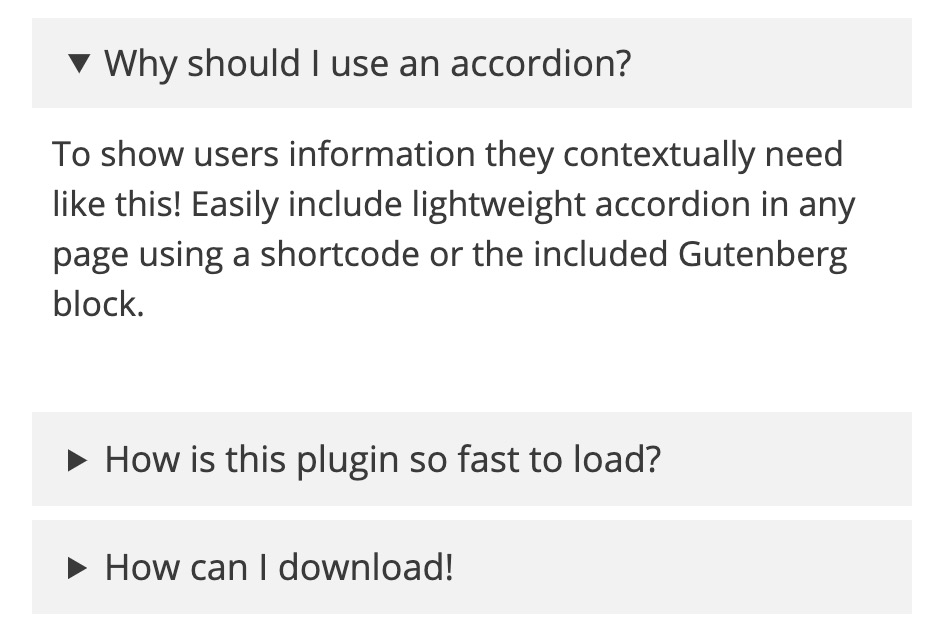
This extremely lightweight accordion plugin for WordPress lets you add collapsible sections to any page using the block editor or a shortcode. It uses the native HTML details tag and a few lines of CSS, so there’s no JavaScript and no jQuery. The whole stylesheet is under 1KB gzipped, and it only loads on pages that actually use an accordion. If you are still weighing options, we compare it against the other WordPress accordion plugins too.
What’s new in 1.8
- Ready-made patterns. Open the Patterns tab in the block inserter and look under Accordions for an FAQ section (heading questions with FAQ schema, one answer open at a time), an accordion group with the first section open, and bordered accordions with plus and minus icons.
- Border controls that actually apply. The radius, color, width and style settings in the block’s Styles panel now work whenever your theme supports them.
- Leaner loading everywhere. The stylesheet now loads only on pages that show an accordion on classic themes too, and shortcode accordions in widgets and page builders get their styles.
- Group fixes. Copy-pasted groups (or a pattern inserted twice) no longer close each other, and an accordion nested inside a group no longer closes its own parent when opened.
- Cleaner FAQ schema. Question names no longer contain HTML entities, each question is listed once even if the theme renders the content twice, and accordions without a title are skipped.
- Layout fixes. Floated images inside an open accordion are no longer cut off, an accordion next to a floated image sits beside it as one box, and the icons now match the title size.
Features
- No JavaScript on the front end, it uses the native
detailsandsummarytags - Works in the block editor and in the classic editor via shortcode
- Accordion groups, so only one item in a group stays open at a time
- FAQ schema output as JSON-LD for rich results
- Title colors, background colors, borders and a choice of heading tag
- CSS only loads on pages where an accordion is used, and the whole stylesheet is under 1KB gzipped
- Ready-made block patterns for an FAQ section, an accordion group and bordered accordions
- Chevron, plus/minus or no icon, on either side of the title
- Smooth open and close animation in pure CSS that respects reduced motion settings
- Spacing, typography and border controls in the block’s Styles panel
- Links to an accordion’s anchor open it automatically
Using the block
The quickest start is a pattern: open the block inserter, switch to the Patterns tab and choose Accordions. You get an FAQ section, an accordion group or a set of bordered accordions that you can edit like any other blocks.
To build one from scratch, search for “Lightweight Accordion” in the block inserter, then type your title and drop any blocks you want inside the body. Everything else lives in the block sidebar: open by default, border, heading tag, icon style, FAQ schema and title colors.
To build a set of questions where only one answer is open at a time, click Add Item in the block toolbar. That wraps your accordion in a group and adds a second one, and you can keep clicking to add more.
Margin, padding, font size, line height and the border’s radius, color, width and style are in the block’s Styles panel, as long as your theme supports those controls.
Using the shortcode
Here’s the simplest version:
[lightweight-accordion title="My Accordion"]My Content[/lightweight-accordion]Open it by default:
[lightweight-accordion title="My Accordion" accordion_open=true]My Content[/lightweight-accordion]Use a chevron icon on the right side of the title:
[lightweight-accordion title="My Accordion" icon="chevron" icon_position="right"]My Content[/lightweight-accordion]Add FAQ schema so the question and answer can show up as a rich result:
[lightweight-accordion title="What is your return policy?" schema="faq"]You have 1 week to return your items[/lightweight-accordion]Group several accordions so opening one closes the others:
[lightweight-accordion title="Question 1" group="faq"]Answer 1[/lightweight-accordion]
[lightweight-accordion title="Question 2" group="faq"]Answer 2[/lightweight-accordion]
[lightweight-accordion title="Question 3" group="faq"]Answer 3[/lightweight-accordion]
Shortcode options
Every option below is also available in the block sidebar.
| Option | Default | What it does |
|---|---|---|
title | none | Required. The clickable title at the top of the accordion. |
title_tag | span | The HTML tag wrapping the title. Use a heading tag (h2 through h6) if you want it in the page outline. |
accordion_open | false | Set to true to have the accordion open on page load. |
bordered | false | Set to true to add a border around the accordion content. |
icon | triangle | Set to chevron, plus or none to change the marker. The chevron rotates and the plus becomes a minus when opened. |
icon_position | left | Set to right to move the icon to the right side of the title. |
group | false | Give several accordions the same group name and only one stays open at a time. Uses the native details name attribute, so it needs no JavaScript. |
schema | false | Set to faq to include this question and answer in the page’s FAQ schema. |
title_text_color | none | Any CSS color or hex value for the title text. |
title_background_color | none | Any CSS color or hex value for the title background. |
anchor | none | Adds an ID to the accordion so you can link straight to it. Linking to it opens it. |
class | none | Adds a custom class to the accordion’s outer div. |
autop | true | Set to false to stop WordPress wrapping the content in paragraph tags. |
Filters for developers
Stop the front end stylesheet from loading (style the accordion yourself):
add_filter('lightweight_accordion_include_frontend_stylesheet', '__return_false');Load the stylesheet on every page instead of only where an accordion is used:
add_filter('lightweight_accordion_always_include_frontend_stylesheet', '__return_true');Stop the editor stylesheet from loading in the admin:
add_filter('lightweight_accordion_include_admin_stylesheet', '__return_false');Stop shortcodes inside accordion content from being processed:
add_filter('lightweight_accordion_process_shortcodes', '__return_false');Disable the small inline script that opens an accordion when it’s the target of a URL hash:
add_filter('lightweight_accordion_anchor_script', '__return_false');Output FAQ schema as inline microdata instead of JSON-LD (not recommended):
add_filter('lightweight_accordion_output_microdata', '__return_true');Add an “Expand all” button
Because every accordion is a native details element, a few lines can open or close all of them at once. Add a Custom HTML block anywhere on the page with this, and change the two labels if you like:
<button type="button" id="la-toggle-all">Expand all</button>
<script>
document.getElementById('la-toggle-all').addEventListener('click', function () {
  var open = this.textContent === 'Expand all';
  document.querySelectorAll('.lightweight-accordion details').forEach(function (d) { d.open = open; });
  this.textContent = open ? 'Collapse all' : 'Expand all';
});
</script>
Accordions that use the group option still only allow one open at a time, because the browser enforces that.
Requirements
WordPress 6.6 or newer and PHP 7.0 or newer. Version 1.8.0 is tested up to WordPress 7.1.
Press
- Best WordPress Accordion Plugins – WPLeaders