For most WordPress sites, the best accordion plugin is Lightweight Accordion, which uses the browser’s built-in details element and needs no JavaScript to open and close. If you would rather not install anything, WordPress 6.9 and newer include a core Accordion block, and Easy Accordion is the pick when you want templates, extra layouts and AI-generated FAQs.
We built and maintain Lightweight Accordion, so weigh that first pick accordingly. To keep the comparison honest, we checked every option against WordPress 7.1.2 in October 2026: version and install numbers from WordPress.org, what each one loads on the front end (read from its code), and fresh screenshots from a test site.
- Lightweight Accordion loads one stylesheet under 1 KB gzipped and needs no JavaScript to open and close, because it uses the browser’s own
detailselement. - WordPress 6.9 added a core Accordion block with an Auto-close setting. It runs on the Interactivity API, which adds about 15 KB of gzipped JavaScript to the page.
- The core Details block can also keep one item open at a time since WordPress 6.8, using its Name attribute setting.
- Easy Accordion has the most features (15+ blocks, ready templates, FAQ schema and AI-generated FAQs) and loads its own JavaScript on the front end.
- FAQ schema rarely matters now: since August 2023, Google shows FAQ rich results only for well-known government and health sites.
Quick comparison
| Option | Active installs | Latest version | Front-end JavaScript | Best for |
|---|---|---|---|---|
| Lightweight Accordion | 10,000+ | 1.8.0 (October 2026) | None needed | Fast FAQs and simple collapsible sections |
| Core Accordion block | Built in | WordPress 6.9 and newer | About 15 KB gzipped (Interactivity API) | No-plugin accordions with auto-close and icons |
| Core Details block | Built in | WordPress 6.3 and newer | None | A single collapsible section |
| Easy Accordion | 70,000+ | 3.1.10 (August 2026) | Yes, the plugin’s own scripts | Styled FAQ templates, layouts and AI FAQs |
| Accordions by PickPlugins | 20,000+ | 2.3.25 (June 2026) | Yes, jQuery-based | Tabs and image accordions from a builder |
1. Lightweight Accordion
Lightweight Accordion outputs the native HTML details and summary tags plus one small stylesheet, which is 810 bytes gzipped in version 1.8.0 and only loads on pages that show an accordion. Opening and closing needs no JavaScript at all. The only script is a few lines added to pages with accordions so that a link to an accordion’s anchor opens it, and a filter turns that off.
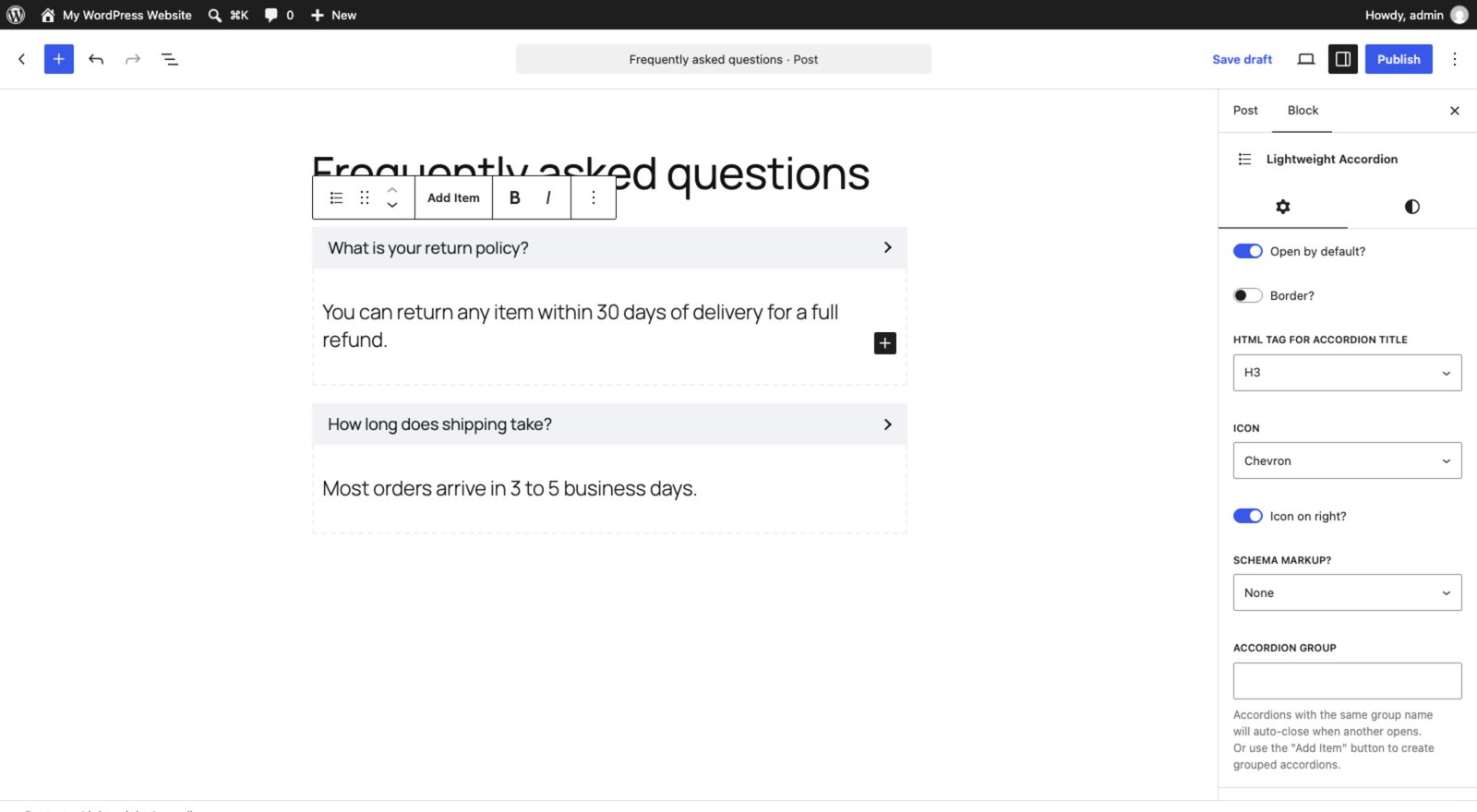
It works as a block or a shortcode, so it fits both the block editor and the classic editor. Each accordion can open by default, use a heading tag for its title, swap the triangle for a chevron or plus icon on either side, add title colors and borders, and join a group so only one stays open at a time. In browsers that support it, opening and closing also animates with CSS alone. Version 1.8 adds ready-made patterns (an FAQ section, an accordion group and bordered accordions) under Accordions in the inserter’s Patterns tab, and the block’s Styles panel has spacing, typography and border controls.
2. The core WordPress Accordion block (no plugin)
WordPress 6.9 added an Accordion block to core, so recent sites already have a full accordion without a plugin. Each item has its own heading and panel, and the block’s settings cover the features people used to install a plugin for:
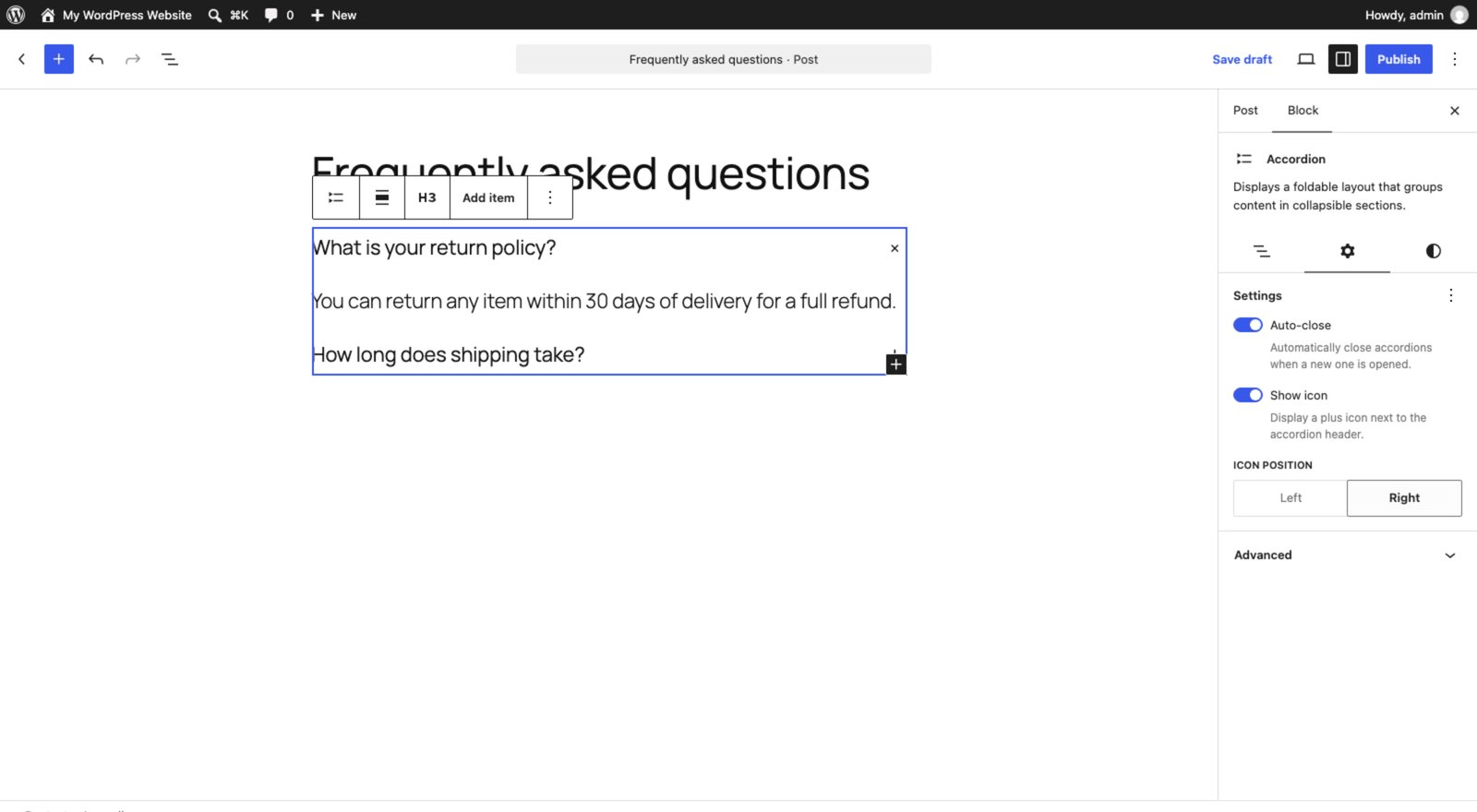
- Auto-close, which closes the other items when one opens.
- Show icon, a plus icon next to each heading, on the left or right.
- Heading level for the item titles (H3 by default), plus Open by default on individual items.
- Color, typography, border, spacing and shadow controls.
The trade-off is weight. The block runs on WordPress’s Interactivity API, so a page with it loads a small view script (about 0.6 KB gzipped) plus the Interactivity runtime (about 15 KB gzipped) unless another block already loads it. It also has no FAQ schema option.
3. The core Details block (no plugin)
The Details block, in core since WordPress 6.3, is the simplest option: one collapsible section with a summary line, built on the same details element as Lightweight Accordion, with no JavaScript. It has an Open by default setting, and since WordPress 6.8 its Advanced panel has a Name attribute field. Give several Details blocks the same name and only one of them stays open at a time.
It has no icon options, animation or schema, and how it looks depends mostly on your theme. For a single “read more” section or a short FAQ, that is often all you need.
4. Easy Accordion
Easy Accordion by ShapedPlugin is the most installed dedicated accordion plugin, with more than 70,000 active installs. It is now block-first: the free version adds 15+ FAQ and accordion blocks and 200+ ready-made patterns, and each block starts from a template picker.
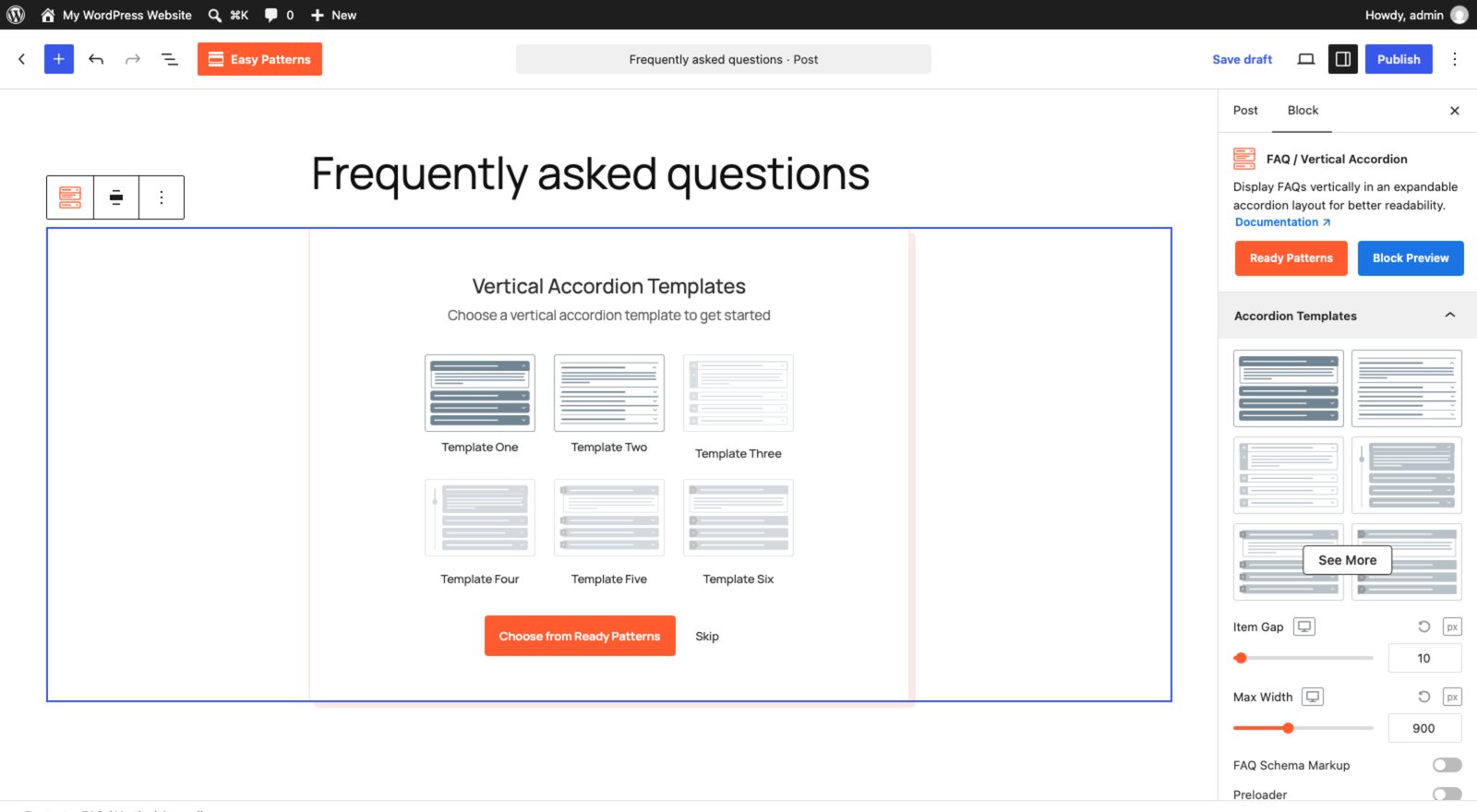
Its readme lists FAQ schema, nested accordions, AI-generated FAQs, reusable templates and a choice of click, hover or autoplay to open items among its key features. The Pro version adds layouts such as timeline and numbered accordions, user-submitted FAQ forms and analytics. Unlike the options above, it loads its own JavaScript on the front end to animate and toggle items.
5. Accordions by PickPlugins
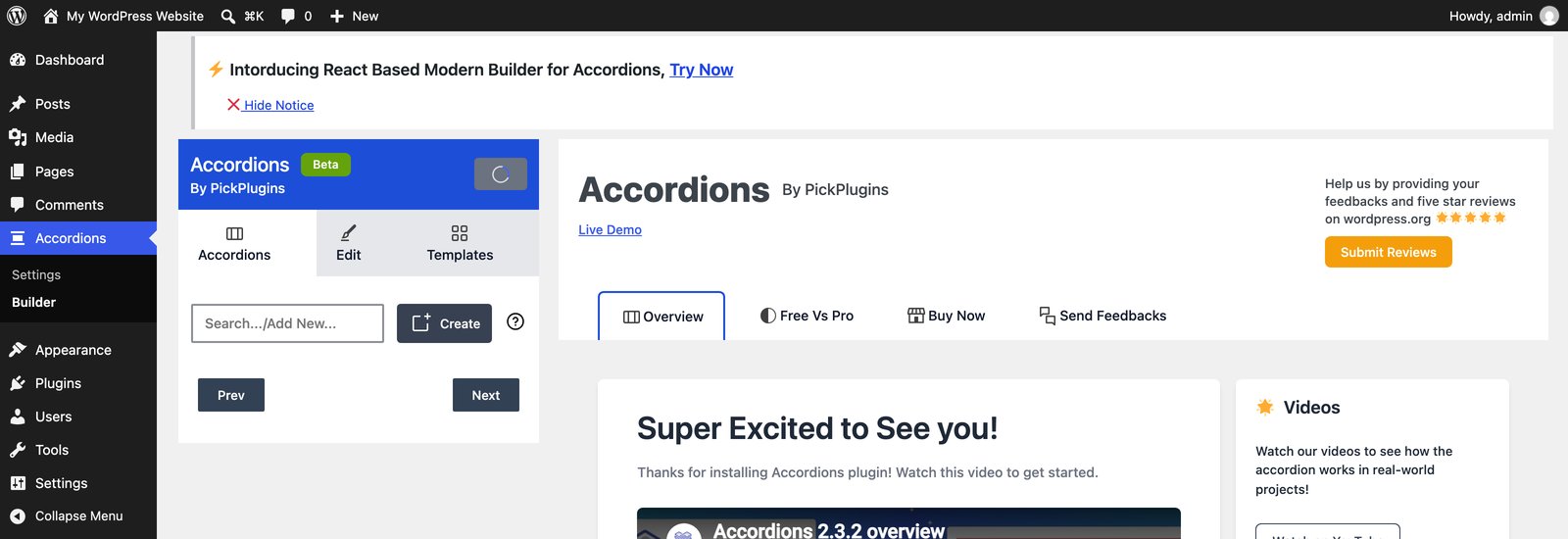
Accordions by PickPlugins (20,000+ active installs) takes a different approach: you build accordions, tabs and image accordions in its own builder screen under Accordions > Builder, then place them with a shortcode. Its readme lists sortable items, FAQ schema, a setting to keep several items open, URL hash links to individual items and OpenAI-powered FAQ generation.
Two things to know before choosing it. Its front-end scripts depend on jQuery and it can load icon font libraries such as Font Awesome, so it is the heaviest option here. And at the time of writing its last update was June 8, 2026, with WordPress 7.0 as the latest version it lists as tested.
Which accordion should you use?
- One collapsible section, or a short FAQ on a recent WordPress: use the core Details block, and give the blocks a shared name if only one should stay open.
- An accordion with icons and auto-close but no plugin: use the core Accordion block on WordPress 6.9 or newer, and accept the Interactivity API script.
- The lightest option that still works in the classic editor and with shortcodes: use Lightweight Accordion.
- Designed FAQ templates, horizontal or image layouts, or AI-written FAQs: use Easy Accordion.
- Tabs and image accordions managed from one builder screen: use Accordions by PickPlugins.
FAQ schema should not decide your pick. Lightweight Accordion, Easy Accordion and Accordions can all output it, but since August 2023 Google shows FAQ rich results only for well-known, authoritative government and health sites.
If page speed is the priority, see our guide to speeding up WordPress, where every extra script counts.
Frequently asked questions
Does WordPress have a built-in accordion?
Yes. WordPress 6.9 added a core Accordion block with auto-close and icon settings, and the Details block, in core since WordPress 6.3, gives you a single collapsible section. Since WordPress 6.8 the Details block’s Name attribute setting lets several of them work as a group where only one stays open.
How do I make only one accordion item open at a time?
In the core Accordion block, turn on Auto-close. With Details blocks, give each one the same Name attribute in the Advanced panel. In Lightweight Accordion, use the Add Item button or give accordions the same group name. All three rely on the browser except the Accordion block, which uses a small script.
Do I still need FAQ schema on my accordions?
Usually not for rich results. Since August 2023, Google shows FAQ rich results only for well-known, authoritative government and health websites. The markup does no harm, so leaving it on is fine, but it will not add FAQ dropdowns to most sites’ search listings.
What is the fastest accordion for WordPress?
Options built on the native details element are the lightest, because opening and closing needs no JavaScript. That means the core Details block or Lightweight Accordion. The core Accordion block adds the Interactivity API runtime, and Easy Accordion and Accordions load their own scripts.
Can I use an accordion in the classic editor?
Yes, with a shortcode. Lightweight Accordion has a shortcode, and Easy Accordion and Accordions also place accordions with shortcodes. The core Accordion and Details blocks only work in the block editor.