WordPress 7.0 “Armstrong” shipped on May 20, 2026, the first major release of the 7.x series and the 30th major version of WordPress since 1.0 “Miles” in January 2004. Release lead Matias Ventura and a global team of 875+ contributors (including 200+ first-time contributors) landed 420+ enhancements and fixes across Core and Gutenberg.
The headline framing from the release announcement: “WordPress 7.0 marks the start of a new era, laying the foundation for AI across the WordPress experience.” AI integration in Core, a modernized dashboard, four new blocks, server-side block registration, and the headline feature that didn’t ship (real-time collaboration, pulled May 8) are the story.
- WordPress 7.0 “Armstrong” (released May 20, 2026) brings AI into core via the AI Client and Abilities API, but ships no active AI features out of the box.
- Real-Time Collaboration was pulled before release and is lined up for a second attempt in a later version.
- It also adds a modernized dashboard, new blocks, and developer improvements.
- Update on a staging site and check plugin compatibility before pushing 7.0 to production.
The Headline: AI Comes to WordPress Core
The biggest shift in 7.0 is that WordPress Core can now talk to AI models natively. There are four moving pieces:
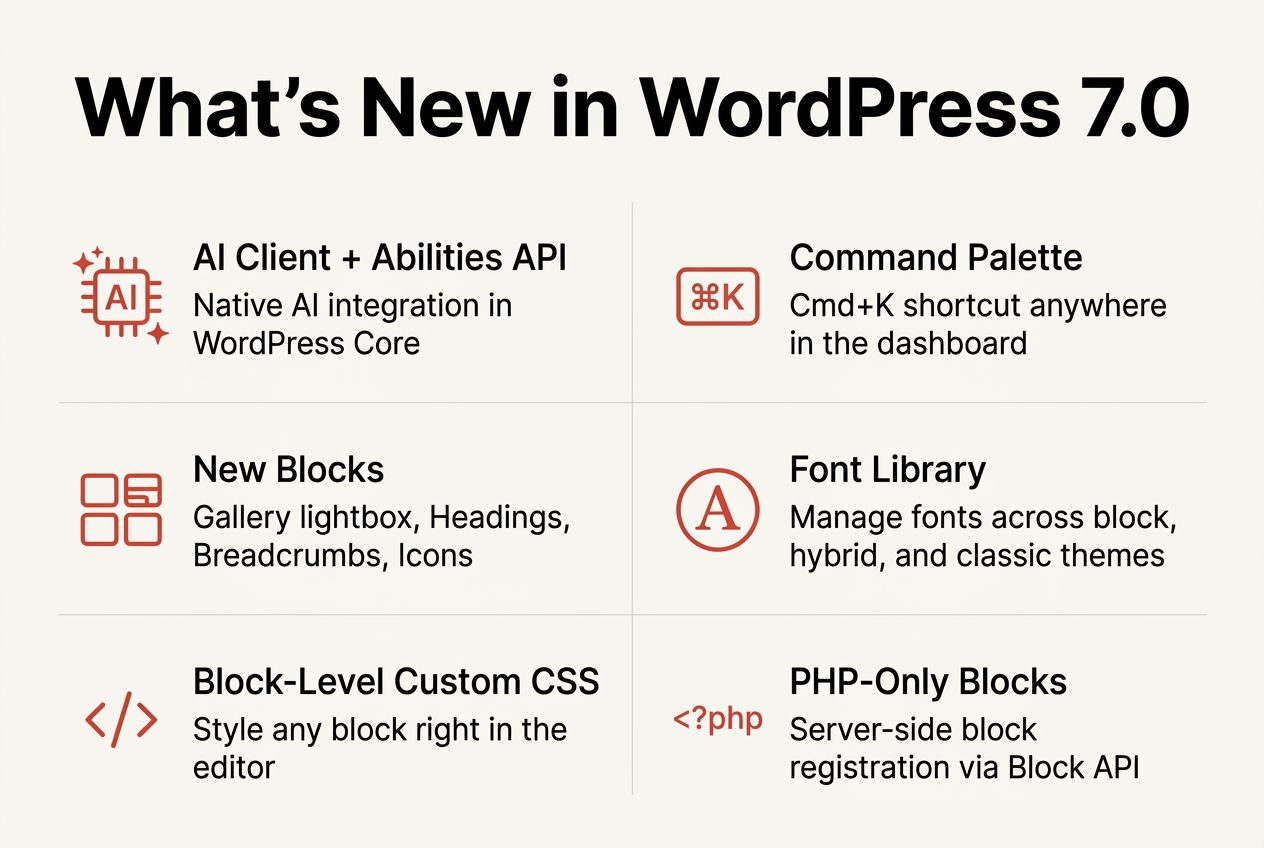
- AI Client (Core). A new client built into WordPress that handles communication with generative AI models. Plugins, themes, and Core features can use it without bundling their own SDKs.
- Abilities API (server). A PHP-side API for registering specific AI-powered “abilities” (generate, summarize, suggest, etc.) and exposing them to other parts of WordPress. Originally shipped in WordPress 6.9; 7.0 builds on it with the new AI Client.
- Client-Side Abilities (JavaScript). The JS counterpart to the Abilities API, with a built-in UI and a command palette so abilities can be invoked from anywhere in the editor.
- Connectors screen. A central dashboard hub for managing external AI service connections. Ships with three presets to get started, and supports your own connections with a few clicks of authentication.
By itself, the AI Client doesn’t generate anything; it’s the plumbing. To actually generate images, titles, excerpts, or alt text, you install the new optional AI plugin that sits on top of the Client and Abilities API. The plugin is opt-in, so a stock 7.0 install is no more or less AI-y than a stock 6.9 install until you turn it on.
For developers, the real win is that the Abilities API gives you a single, opinionated place to plug AI features into without writing your own OpenAI or Claude or whoever-else wrapper. If you’ve ever shipped an AI feature in WordPress before, you know how much of that code has been re-invented across plugins. 7.0 consolidates that into Core.
The Headline That Didn’t Ship: Real-Time Collaboration
Real-time collaboration was supposed to be the marquee feature of 7.0. Multiple editors in the same post simultaneously, the way Google Docs handles concurrent editing. It had been in development for several release cycles, with parts of the infrastructure (block notes in 6.9, presence APIs) landing incrementally.
On May 8, twelve days before release, Matt Mullenweg pulled the feature. The official reasons: “concerns around surface area, race conditions, server load, memory efficiency, and recurring bugs found through fuzz testing.” RTC isn’t shelved permanently; the team is preparing a feature-plugin testing phase before another Core merge attempt in a future release. The community response to the removal was largely supportive, with the common view being that a delayed but stable feature beats a rushed one.
If you want the full background on why RTC was removed and what it means for the WordPress roadmap, we covered it in detail: Real-Time Collaboration Removed from WordPress 7.0.
The Modernized Dashboard
The wp-admin you log into on a fresh 7.0 install looks meaningfully different from 6.9. Most users will notice this first, before any of the AI stuff.
- New color scheme and finishes. Cleaner palette, more whitespace, smooth transitions between screens. The most thorough admin theme update WordPress has shipped in a long time.
- Command Palette. The
Cmd+K(orCtrl+K) fuzzy-search palette that jumps you anywhere in the dashboard. Originally expanded across the dashboard in WordPress 6.9; 7.0 refines its placement in the admin bar and broadens what it can do. Borrowed from dev tools like VS Code and Linear, and it’s the single change you’ll feel most often once you’re used to it. - Font Library. A dedicated screen for installing, uploading, and managing fonts across block, hybrid, and classic themes. Previously fragmented across theme settings and plugins; now centralized.
- Visual revisions scrubber. The Revisions screen now shows visual markers indicating what actually changed at each save point. Easier to find the version you want without diffing text walls.
- Iframed editor enforced for v3 blocks. When every block on a page uses Block API v3 or higher, the post editor now runs inside an iframe by default. This fixes a long-standing class of CSS bleed issues between admin and editor styles.
New Blocks and Editor Improvements
Four new blocks shipped, plus meaningful upgrades to existing ones.
- Gallery (lightbox). The Gallery block now supports a lightbox slideshow mode out of the box. No plugin required.
- Heading block (refined). A reworked Heading block with cleaner markup output and granular control over heading-level styles.
- Breadcrumbs. A native Breadcrumbs block. Until 7.0, breadcrumbs meant Yoast, Rank Math, or a custom shortcode. Now it’s a Core block with theme.json styling support.
- Icons. A native Icons block with a library of common UI icons. Useful for feature lists, callouts, and anywhere you’d previously embedded SVGs by hand.
Beyond the new blocks, four editor-wide upgrades are worth flagging:
- Block-level custom CSS. You can now apply custom CSS to any individual block, right in the editor sidebar. No more child theme just to style one section.
- Responsive controls. Hide or show blocks per device (desktop, tablet, mobile), adjust styles for different breakpoints, and customize what those breakpoints are. The kind of thing site builders have wanted in Core for years.
- Block-based menu overlay. The mobile menu overlay is now fully customizable with blocks and patterns. Add columns, custom typography, an embedded close button, or whatever else the design calls for.
- Patterns as single units. Patterns now act as a single unit by default with detachable elements for isolated control, plus a contentOnly mode where developers mark which attributes are editable content vs design scaffolding.
What’s New for Developers
7.0 is the biggest developer release in a while. The headline items:
- PHP-only block registration. Blocks and patterns can now be registered server-side using only PHP, auto-registered through the Block API. The JavaScript build pipeline isn’t required for simple blocks anymore, which lowers the barrier for plugin authors who don’t want to set up webpack/wp-scripts just to ship a couple of blocks. Lives nicely next to other PHP-only customizations you’d put in functions.php or a custom plugin.
- Extensible Site Editor. The Site Editor now exposes a routing layer with route validation, plus a new
wordpress/bootpackage that lets plugins build custom Site Editor pages. The Site Editor is no longer a fixed set of screens; it’s a platform that plugins can extend. - Interactivity API additions. A new
watch()function (subscribe to signal changes) and adata-wp-watchDOM directive for lifecycle reactions. Useful for blocks that need to respond to state changes without re-rendering. - Block bindings. A new
block_bindings_supported_attributesfilter lets you control which attributes on a custom block can be overridden by Pattern overrides. - Scripts can depend on modules. The script loader now allows traditional scripts to declare dependencies on ESM modules, smoothing the JS-to-modules transition.
Minimum requirements
PHP 7.4 is now the minimum. WordPress 7.0 drops support for PHP 7.2 and 7.3. If you’re on shared hosting that hasn’t been touched in years, check your PHP version before updating. Site Health flags this directly. Most major hosts default to PHP 8.1 or 8.2 for new sites, so this only bites legacy hosting setups.
Library updates
- backbone.js → 1.6.1
- Requests → 2.0.17
- CodeMirror → v5 (with ESLint and CSSLint updates; Esprima replaced with Espree)
- PHPMailer → 7.0.2
Removals and Deprecations
If you maintain a plugin or theme, these are the breaking changes to know:
- Real-time collaboration. The biggest “deprecation” is that RTC never landed. If your roadmap assumed it would, plan around a future release timeline (no version target has been announced).
- HTML5 script theme support removed. Themes that used
add_theme_support( 'html5', array( 'script' ) )need to drop that argument. The script loader handles HTML5 script output natively now. - Title attributes removed from author link functions by default. Functions like
get_the_author_link()no longer add atitleattribute. There’s a new$use_title_attrparameter if you specifically need it back. - Pattern contentOnly defaults. Patterns default to contentOnly mode now. If you’ve built blocks that rely on patterns staying fully editable, set
"role": "content"on the content attributes to avoid them being hidden from editors.
Should You Update?
The honest answer for most sites: not on day one. WordPress major releases generally settle in over a 7-to-14-day window as plugin and theme authors push compatibility patches. Even when a release is well-tested, the combination of your specific stack rarely matches the testing matrix exactly.
A safe update timeline:
- Day 0 (May 20). Update a staging copy of your site. Run through your most-used flows. Note anything that breaks.
- Days 1-7. Watch your plugin update feed. Most active plugins will ship a 7.0-compatible release in this window. If a critical plugin hasn’t, that’s your signal to wait.
- Days 7-14. If staging is clean and your plugins are updated, push to production. Take a full backup first (you should be doing this anyway).
- If you’re on PHP 7.2 or 7.3. Don’t update WordPress yet. Update PHP first, in a staging environment, then update WordPress. Updating both at once gives you two failure modes to debug instead of one.
The exception: if you’re spinning up a brand-new site, install 7.0 directly. There’s no upside to starting on 6.9.
How to Update to WordPress 7.0
- Full backup. Files and database. Use UpdraftPlus, Solid Backups, or your host’s snapshot tool. Verify the backup downloads before you touch anything.
- Test on staging. Most managed hosts (WP Engine, Kinsta, SiteGround, Cloudways) include one-click staging. Use it. If you don’t have staging, a local copy via Local or DevKinsta works too.
- Update plugins and themes first. On the staging copy, update everything to its latest version before you touch WordPress core. Plugins that aren’t yet 7.0-compatible will throw warnings here, not after Core updates.
- Run the WordPress 7.0 update. Dashboard > Updates > Update to 7.0. Or from the command line,
wp core update --version=7.0via WP-CLI. - Resave permalinks. Settings > Permalinks > Save Changes. Regenerates rewrite rules in case anything shifted. Belt and suspenders.
- Smoke-test the front-end. Visit your homepage, a post, a category archive, and any custom flow that matters to your business. Check the editor too.
- Push to production. When staging is clean, repeat the update on the live site. Or sync staging up if your host supports it.
The Codename: Why “Armstrong”?
Every WordPress major release since 1.0 has been named after a jazz musician. The tradition started with 1.0 “Miles” (Miles Davis) in January 2004 and has continued through 30 major versions: 6.9 was “Gene Harris,” 6.8 was “Cecil” (Cecil Taylor), 6.7 was “Rollins” (Sonny Rollins), and so on.
7.0 honors Louis “Satchmo” Armstrong, the jazz trumpeter widely credited as the “first great jazz soloist.” Armstrong is the figure who transformed jazz from an orchestral art form into a solo art form, introduced improvisation as a central element, and influenced essentially every artist who came after him. From the release announcement: “Louis Armstrong wove his personal touch into the world of Jazz. With WordPress 7.0 ‘Armstrong,’ you can build with yours.”
For the full naming history (every version from 1.0 “Miles” to 7.0 “Armstrong” with what each one shipped), see our WordPress Version History.
Frequently Asked Questions
When was WordPress 7.0 released?
May 20, 2026. The release was originally targeted for April 9 but slipped to May to give the team more time to address testing feedback on real-time collaboration. RTC was ultimately removed from the release on May 8, but the ship date held.
What’s the codename for WordPress 7.0?
“Armstrong,” in honor of Louis “Satchmo” Armstrong, the jazz trumpeter who transformed jazz from an orchestral art form into a solo art form. Every WordPress major release since 1.0 “Miles” (Miles Davis) has been named after a jazz musician.
What is the minimum PHP version for WordPress 7.0?
PHP 7.4. WordPress 7.0 drops support for PHP 7.2 and 7.3. Most major WordPress hosts have been defaulting to PHP 8.1 or higher for new sites, so this only affects legacy hosting setups. Check Site Health or your host’s control panel to see your current PHP version before updating.
Did real-time collaboration ship in WordPress 7.0?
No. Real-time collaboration was originally planned as the headline feature, but Matt Mullenweg removed it from the release on May 8, 2026 citing concerns about surface area, race conditions, server load, memory efficiency, and recurring bugs found through fuzz testing. The feature is not shelved permanently; the team plans broader testing toward a future release. Full breakdown of what happened. If a single person pulling a headline feature raises the question of how WordPress is governed, who actually owns WordPress lays out where that authority sits.
Is WordPress 7.0 AI-powered by default?
No. WordPress 7.0 ships with the infrastructure for AI (the AI Client and Abilities API) but no AI features are active out of the box. To actually generate content with AI, you install the new optional AI plugin separately. A stock 7.0 install with no extras is no more AI-y than a stock 6.9 install. The Core changes are plumbing, not behavior.
How do I open the new Command Palette?
Press Cmd+K on Mac or Ctrl+K on Windows/Linux from anywhere in the WordPress dashboard. There’s also a Command Palette icon in the upper admin bar if you forget the shortcut. The palette is fuzzy-search and lets you jump to any admin screen, post, or registered command.
Should I update to WordPress 7.0 right away?
For most sites, wait 7-14 days. Update a staging copy first, watch your plugins for 7.0-compatible releases, then push to production once your stack is settled. For brand-new sites you’re spinning up this week, install 7.0 directly; there’s no upside to starting on 6.9. Always full-backup before updating.
When is WordPress 7.1 expected?
The schedule has firmed up since launch: WordPress 7.1 is now in beta, with the final release planned for August 19, 2026, timed to the last day of WordCamp US. Our preview covers what has landed in the betas so far. Real-time collaboration is being rebuilt as a feature plugin and is a candidate for a release after 7.0, so these dates can still shift if testing runs long.
Wrapping Up
WordPress 7.0 “Armstrong” is the start of an AI-integrated WordPress and the end of a long road for real-time collaboration. The AI plumbing is the biggest structural change in years. The dashboard refresh is the most visible. The Command Palette is the change you’ll feel daily. And the RTC removal is the story of how WordPress chose stability over its own headline feature.
For deeper context: the official announcement, the field guide (developer-focused), our RTC removal breakdown, and the full WordPress version history from 1.0 “Miles” forward.